Running a branding photography business means balancing creativity with organization — intuition with structure, artistry with workflow. It’s a constant dance between the emotional side of the work and the logistical systems that keep everything moving. Over the years, I’ve refined a workflow that keeps me grounded, intentional, and focused on what matters most: creating images that feel like the truest, most honest version of my clients. That includes a very refined list of tools I use as a branding photographer.
I’m not someone who uses tools just for the sake of using them. I don’t chase trends or collect apps because they’re popular. I choose tools that genuinely support the way I think, create, and connect — tools that help me stay present with my clients, elevate my creative process, and make the behind‑the‑scenes side of my business feel smoother and more aligned.
Some tools have been with me for years because they’ve proven themselves over and over again. Others are newer additions I’m experimenting with — not because I want more, but because I want better. Better support. Better structure. Better flow. I’m always refining, always adjusting, always looking for what actually enhances my work rather than complicating it.
Because the truth is, the tools you choose shape your creative ecosystem. They influence how you plan, how you shoot, how you edit, how you communicate, and how you show up for your clients. And when you’re a branding photographer, your tools don’t just support your workflow — they support the emotional experience you create for the people in front of your camera.
This is a look at the tools that shape my everyday workflow, the ones that help me stay organized and inspired, and a few I’m currently testing to see if they deserve a permanent place in my creative world. Whether you’re a photographer, a creative entrepreneur, or someone curious about the behind‑the‑scenes of branding photography, I hope this gives you a clearer picture of what supports my process — and maybe inspires you to refine your own.
And because this post is part of a larger conversation about why creatives struggle to be seen, I also want to show you the tools that help me create environments where clients feel safe, confident, and fully themselves. Tools matter — not because they make you more professional, but because they help you create the conditions where authenticity can thrive.
My Camera Setup (The Heart of My Work)
My camera gear is intentionally minimal. I prefer tools that are reliable, versatile, and unobtrusive — equipment that lets me stay present with my clients instead of fussing with settings or carrying heavy bags that distract from the emotional tone of the session.
My goal is always the same: create a calm, grounded environment where clients feel safe, relaxed, and fully themselves. Minimal gear helps me do that.
Here’s what I use for every branding session:
- Canon Full Frame Mirrorless Camera
- Canon Mount Adapter EF–EOS R
- Sigma 24–70mm
- Godox TT600 Speedlite
If you want a deeper look at why I keep my gear so minimal, I wrote about it here: Why I Keep My Gear Minimal During Branding Sessions
Lightroom — My Editing Home Base
Lightroom is where every image comes to life. It’s clean, intuitive, and powerful without being overwhelming — the perfect balance for a photographer who values simplicity but still wants full creative control.
I use Lightroom for:
- Color grading
- Batch editing
- Preset creation
- Final export workflows
It’s the one editing tool I couldn’t imagine working without. My entire editing philosophy is built around subtlety, warmth, and emotional clarity — and Lightroom gives me the space to create that consistently.
Photoshop — For Detailed Retouching When Needed
While Lightroom handles 90% of my editing, Photoshop is where I go when I need precision. I keep my Photoshop workflow simple and minimal, using only a handful of tools to maintain a natural, true‑to‑life look.
I use Photoshop for:
- subtle skin retouching
- removing distractions
- fine‑tuning details
- cleanup work that requires more control
I don’t believe in over‑editing. My goal is always to preserve the authenticity of the moment while enhancing the image just enough to let the subject shine.
Canva — For Quick Graphics, Social Posts, and Client Deliverables
Most of my creative work happens in‑camera and in Lightroom, but Canva is the tool I reach for when I need to create something polished quickly — without opening Photoshop or building something from scratch.
I use Canva for:
- social media graphics
- client guides
- PDF resources
- moodboard layouts
- simple marketing materials
- visual add‑ons that support a client’s brand
I keep my designs minimal and clean, and Canva makes that effortless. It’s also incredibly helpful when I need to deliver something visual to clients that supports their brand beyond the photos themselves.
Milanote — My Creative Brain
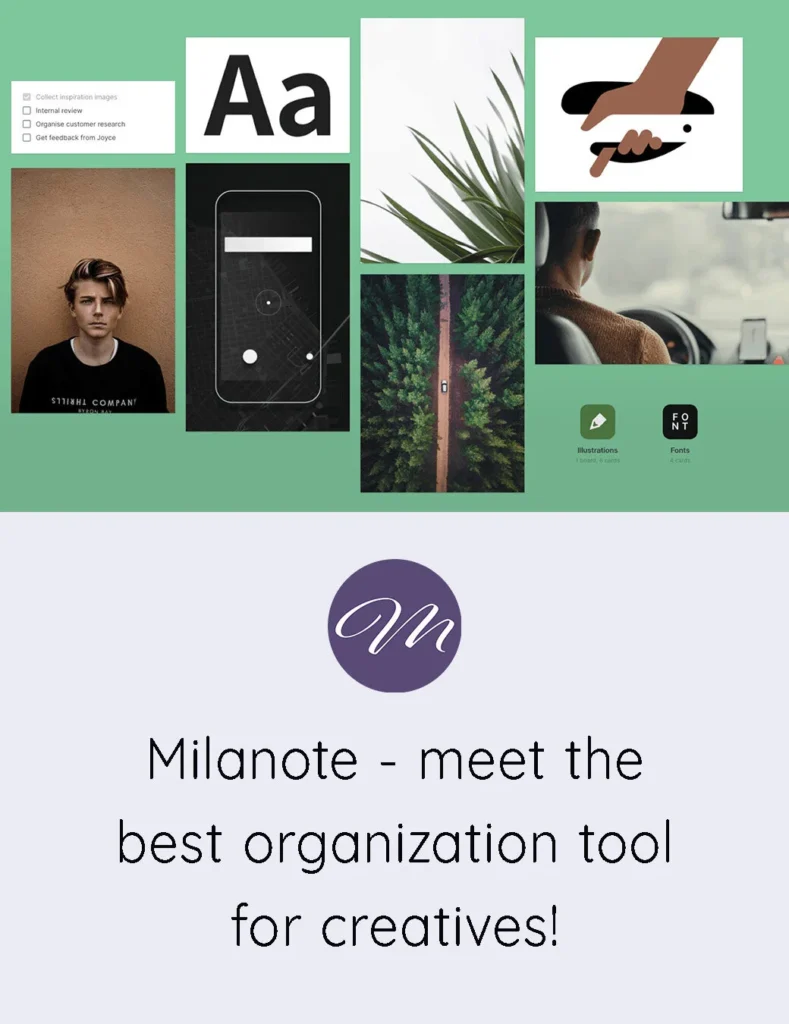
Milanote is where every branding project begins. It’s visual, flexible, and perfectly aligned with how I think creatively. It allows me to see the entire story of a brand before I ever pick up my camera.
I use it to:
- Build moodboards
- Map out brand stories
- Create shot lists
- Organize client notes
- Visualize the overall direction of a session
Milanote is still the heart of my planning process. It’s where ideas take shape, where concepts become visual, and where I can explore the emotional tone of a session long before the shoot day arrives.
HoneyBook — Where I Create My Contracts and Invoices
For the business side of my photography work, I keep things as simple and streamlined as possible. HoneyBook is the platform I use to send contracts, create invoices, manage payments, and keep all client communication in one place.
It removes the back‑and‑forth and gives my clients a smooth, professional experience from the moment they book.
Everything — proposals, signatures, questionnaires, timelines — lives in one clean dashboard. It keeps my workflow organized without adding complexity.
If you’d like to try it, you can enjoy 30% off your first year through my link: Explore HoneyBook
The New Tool I’m Testing: HyNote
I’m always curious about tools that might support the more administrative or research‑heavy parts of my work. Recently, I started testing HyNote, an AI‑powered note‑taking platform that turns audio, files, links, and documents into structured notes, summaries, and action items.
What HyNote Does
HyNote can:
- Transcribe client calls
- Summarize long videos or audio clips
- Extract key points from documents
- Organize research into searchable notes
- Export to PDF, Markdown, HTML, and Google Workspace
It’s designed for people who deal with a lot of information — creators, consultants, educators, and anyone who wants their notes to be smarter and more structured.
How It Fits Into My Workflow
Milanote is still my main creative hub. But HyNote has been helpful for:
- Quick note‑taking during client calls
- Summaries of long tutorials or interviews
- Organizing scattered research for writing projects
It’s a companion tool for now, and I’m exploring where it might support my process long‑term.
Why I Share These Tools
My audience includes entrepreneurs, creatives, and small business owners — people who care deeply about the work they put into the world and the experience they create for their clients. They’re thoughtful, intentional, and often juggling a hundred moving pieces behind the scenes. They appreciate tools that make their work smoother, more organized, and more aligned with the way they naturally think and create.
These are the people who want their systems to support them, not overwhelm them. They want clarity instead of clutter, flow instead of friction, and tools that actually make their creative lives easier — not more complicated. And because I’m the same way, I only share tools that genuinely help me stay grounded, focused, and connected to the heart of my work.
Every tool I use has a purpose. Some support the emotional side of my process — helping me stay present, intuitive, and connected during sessions. Others support the practical side — keeping my business organized, my communication clear, and my workflow smooth from start to finish. Together, they create a structure that allows me to show up fully for my clients without feeling scattered or stretched thin.
If any of these tools end up supporting your workflow too, that’s a beautiful bonus. And if you have tools you swear by — the ones you can’t imagine running your business without — I’d genuinely love to hear about them. I’m always curious what other creatives are using, loving, and relying on to bring their best work into the world.
Disclaimer: Some links may be affiliate links, which means I may earn a small commission at no extra cost to you.
A gentle next step
If you’re someone who values intention, clarity, and emotional alignment in your work — someone who wants their business to feel like an extension of who they are, not a performance they have to maintain — I created something that might support you even more deeply.
It’s called Soulful Creative Business, and it’s a self‑paced guide for creatives who want to build a business with softness, steadiness, and a sense of inner grounding. No hustle. No pressure. No forcing yourself into strategies that don’t feel like you.
Inside, you’ll learn how to:
- build a business that supports your energy instead of draining it
- create offerings that feel aligned with your values and your season of life
- show up consistently without burning out
- simplify your workflow so you can focus on what actually matters
- grow in a way that feels sustainable, intuitive, and emotionally spacious
If you’ve been craving a business that feels more like you — one that honours your creativity, your sensitivity, and your natural rhythm — this is your invitation to explore a softer way forward.